

Download HTML Link Validator – free, secure link checker for Windows, macOS and Linux
Introduction
Every website owner knows the pain of discovering broken links after a page has been published. A single dead link can hurt user experience, damage SEO rankings, and erode trust in your brand. HTML Link Validator is designed to eliminate that frustration by providing a fast, reliable, and fully automated way to scan an entire site for broken or misplaced URLs.
Whether you run a personal blog, an e‑commerce storefront, or a large corporate portal, this tool offers a straightforward solution that works on Windows, macOS, and Linux platforms. In this review we’ll walk through what the application does, how it performs, and why it might be the right choice for your link‑maintenance workflow. You’ll also find detailed installation steps, a comprehensive feature list, real‑world pros and cons, and answers to the most common questions users have about HTML Link Validator.
By the end of the article you’ll have a clear picture of whether this free utility deserves a place in your web‑development toolkit.
What Is HTML Link Validator? – Overview & Core Features
HTML Link Validator is a lightweight yet powerful desktop application that crawls web pages, local HTML files, and even browser bookmarks to identify broken, redirected, or case‑sensitive links. The program operates as a self‑contained web spider when pointed at a live website, gathering every hyperlink it encounters and testing each one against configurable timeout and retry settings. The result is a detailed report that highlights which URLs failed, why they failed (e.g., 404 Not Found, timeout, DNS error), and where the problematic link resides in your source files. The interface is simple: drop a folder, enter a URL, or import a list of pages, click “Start Scan,” and let the engine do the heavy lifting. Results can be exported to CSV or HTML for easy sharing with development teams or SEO consultants.
Key Features
- Batch validation of thousands of links in a single run.
- Case‑sensitive checking for URLs that differentiate between upper‑ and lower‑case paths.
- Supports scanning of live websites, local file systems, and browser bookmark files.
- Adjustable thread timeout and maximum concurrent threads to avoid firewall or server throttling.
- Automatic web‑spider mode that follows internal links across an entire domain.
- Exportable reports in CSV, HTML, and plain‑text formats.
- Filters to include or exclude specific file extensions (e.g., .php, .asp, .html).
- Real‑time progress bar with detailed logging for each scanned page.
- Free for personal and commercial use with optional premium updates for advanced scheduling.
- Cross‑platform binaries for Windows, macOS, and Linux.
Installation, Configuration, and Daily Use
Getting started with HTML Link Validator is intentionally simple. The installer is a single executable for each supported operating system. After downloading the appropriate package from the official website, run the installer and follow the on‑screen prompts. No additional runtime libraries are required because the program bundles its own lightweight runtime environment.
Step‑by‑Step Installation
- Visit the download page and select the installer for your OS (Windows .exe, macOS .dmg, or Linux .tar.gz).
- Run the installer; on Windows you may need to approve the User Account Control dialog.
- Choose the destination folder (default is
C:\Program Files\HTML Link Validatoron Windows). - Complete the installation wizard and launch the application from the desktop shortcut or command line.
Configuring Scan Settings
Once the program opens, you’ll see a clean dashboard with three primary tabs: “Website Scan,” “Local Files,” and “Bookmarks.” In the “Website Scan” tab, paste the root URL of the site you wish to audit. Below the URL field, you’ll find options for:
- Thread Count: Set the number of parallel requests (default 5). Higher numbers speed up scans but may trigger firewall blocks.
- Timeout (seconds): Define how long the tool waits for a response before marking a link as timed out.
- Case Sensitive: Toggle this if your server treats
/About.htmland/about.htmldifferently. - File Filters: Include or exclude certain file types from the crawl.
For local file scans, simply click “Browse” and select the folder containing your HTML pages. The tool will recursively walk the directory tree, applying the same link‑checking logic. Bookmark validation works by importing an exported .html or .json bookmark file from Chrome, Firefox, or Edge.
Running a Scan and Interpreting Results
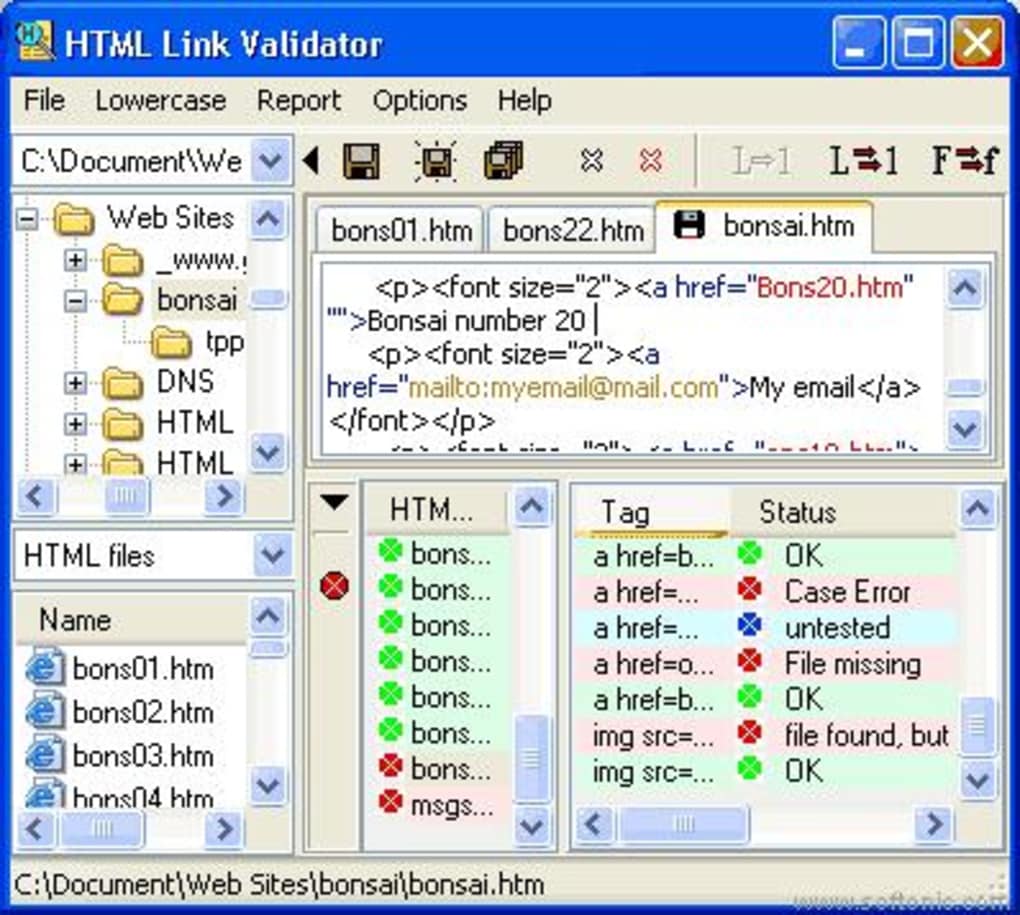
Press the “Start Scan” button and watch the progress bar fill as each page is processed. The log pane displays real‑time messages such as “Fetching https://example.com/about.html – 200 OK” or “Link https://example.com/old‑page.html – 404 Not Found.” When the scan completes, a summary table appears, listing every broken link, the HTTP status code, and the exact file or page where it was found. You can sort the table by status, filter to show only 404 errors, or export the full report for archival purposes.
Because HTML Link Validator stores the last scan’s data locally, you can compare reports over time to see whether broken links are being resolved or new issues are emerging. This feature is especially useful for ongoing SEO maintenance and for teams that need to track link health across multiple releases.
Pros, Cons, and Frequently Asked Questions
Pros
- Fast batch processing: Handles thousands of URLs without noticeable lag.
- Cross‑platform support: Native installers for Windows, macOS, and Linux.
- Flexible scanning modes: Live sites, local files, and browser bookmarks all in one tool.
- Highly configurable: Thread, timeout, and case‑sensitivity settings let you fine‑tune performance.
- Free for commercial use: No licensing fees for small businesses or freelancers.
- Exportable reports: CSV and HTML outputs simplify sharing with developers and SEO analysts.
Cons
- Interface feels a bit dated compared with modern SaaS link‑checkers.
- No built‑in scheduling; you must run scans manually or script the executable.
- Advanced reporting (e.g., trend graphs) requires third‑party tools to visualize the CSV.
- Large sites with tens of thousands of pages may need higher memory allocations on low‑end machines.
FAQ – Your Link‑Validator Questions Answered
Can HTML Link Validator scan password‑protected pages?
Yes. The tool includes an optional authentication dialog where you can supply HTTP Basic or Digest credentials. For more complex login forms, you’ll need to run the scan behind a session cookie generated by a browser extension.
Is there a limit to the number of URLs that can be checked in one run?
There is no hard‑coded limit. The only constraints are your machine’s memory and the timeout settings you configure. Users routinely scan sites with 50,000+ links without issue.
Does the free version include updates?
Yes. The developer releases regular bug‑fix updates and minor feature enhancements at no cost. Major version upgrades (e.g., 2.x to 3.x) are also free, though a donation is encouraged.
Can I integrate the validator into a CI/CD pipeline?
Absolutely. The application ships with a command‑line interface (CLI) that returns an exit code based on the number of broken links found. This makes it easy to add to Jenkins, GitHub Actions, or GitLab CI scripts.
Is my data safe? Does the tool send any information to external servers?
All scanning is performed locally. The only network traffic is the HTTP requests made to the URLs you are testing. No telemetry, usage statistics, or personal data are transmitted unless you voluntarily enable the optional “send anonymous usage report” feature.
Final Verdict – Should You Download HTML Link Validator?
HTML Link Validator strikes a solid balance between power and simplicity. For webmasters, SEO specialists, and developers who need a reliable way to keep their link ecosystem healthy, the tool delivers fast batch scanning, flexible configuration, and cross‑platform compatibility—all at zero cost. While the UI could benefit from a modern refresh and native scheduling, these cosmetic shortcomings do not detract from its core functionality. The ability to run scans from the command line and integrate with CI pipelines makes it future‑proof for development teams that embrace automation.
If broken links are a recurring headache for your site, we recommend downloading HTML Link Validator today, running a full scan, and scheduling periodic checks to stay ahead of the issue. The free version provides everything you need to get started, and the occasional update ensures you’re protected against new web standards and security considerations. Click the button below to begin your download and experience a cleaner, more reliable web presence.







